Make jobs start earlier with needs
- Tier: Free, Premium, Ultimate
- Offering: GitLab.com, GitLab Self-Managed, GitLab Dedicated
Use the needs keyword to specify job dependencies in your pipeline.
Jobs start as soon as their dependencies finish without waiting for pipeline stages to complete.
This lets you run jobs earlier and avoid unnecessary waiting.
Use cases:
- Monorepos: Build and test independent services in parallel execution paths.
- Multi-platform builds: Compile for different platforms without waiting for all builds to finish.
- Faster feedback: Get test results and errors earlier.
The needs: project and needs: pipeline keywords are not used to specify job dependencies.
Use needs: project to fetch artifacts from other pipelines.
Use needs: pipeline to mirror the pipeline status from an upstream pipeline.
needs workflow
By default, jobs run in stages. All jobs in a stage must finish successfully before
any job in a later stage can start. For example, with the default build, test, and deploy stages,
all jobs in build must run and finish before any job in test can start.
With needs, you list specific jobs a job depends on. The job starts immediately after
those dependencies finish, even if other jobs in earlier stages are still running.
This creates a pipeline with a kind of directed acyclic graph (DAG) structure.
You can mix staged jobs and jobs with needs dependencies in the same pipeline.
Additionally, you can use needs: [] to set a job to run immediately without waiting for
earlier jobs or stages to finish. It’s common to run lint jobs or scanners immediately
when they can run on the source code and do not depend on build results.
needs compared to staged jobs
To demonstrate the benefits of needs, we can compare two pipelines with six jobs.
This pipeline has the six jobs organized in stages. Without needs, all jobs in a stage must finish
before the next stage starts, even if some jobs are independent:
graph TB
  subgraph build["Build Stage"]
    build_a["build_app_A"]
    build_b["build_app_B"]
  end
  subgraph test["Test Stage"]
    test_a["test_app_A"]
    test_b["test_app_B"]
  end
  subgraph deploy["Deploy Stage"]
    deploy_a["deploy_app_A"]
    deploy_b["deploy_app_B"]
  end
stages:
  - build
  - test
  - deploy

build_app_A:
  stage: build
  script: echo "Building A..."

build_app_B:
  stage: build
  script: echo "Building B..."

test_app_A:
  stage: test
  script: echo "Testing A..."

test_app_B:
  stage: test
  script: echo "Testing B..."

deploy_app_A:
  stage: deploy
  script: echo "Deploying A..."

deploy_app_B:
  stage: deploy
  script: echo "Deploying B..."
In this example, no test or deploy jobs run until all jobs in the build stage complete.
If the B jobs take a long time to run, the A test and deploy jobs could be delayed while
waiting for B jobs to complete.
With needs, you can define two independent execution paths. Each job depends only on the jobs it actually needs,
allowing parallel execution across the two paths:
graph LR
  subgraph build["Build Stage"]
    build_a["build_app_A"]
    build_b["build_app_B"]
  end
  subgraph test["Test Stage"]
    test_a["test_app_A"]
    test_b["test_app_B"]
  end
  subgraph deploy["Deploy Stage"]
    deploy_a["deploy_app_A"]
    deploy_b["deploy_app_B"]
  end

  build_a --> test_a
  build_b --> test_b
  test_a --> deploy_a
  test_b --> deploy_b
stages:
  - build
  - test
  - deploy

build_app_A:
  stage: build
  script: echo "Building A..."

build_app_B:
  stage: build
  script: echo "Building B..."

test_app_A:
  stage: test
  needs: ["build_app_A"]
  script: echo "Testing A..."

test_app_B:
  stage: test
  needs: ["build_app_B"]
  script: echo "Testing B..."

deploy_app_A:
  stage: deploy
  needs: ["test_app_A"]
  script: echo "Deploying A..."

deploy_app_B:
  stage: deploy
  needs: ["test_app_B"]
  script: echo "Deploying B..."
In this example, test_app_A runs as soon as build_app_A completes successfully,
even if build_app_B is still running. Similarly, deploy_app_A could run and deploy
before build_app_B completes.
View dependencies between jobs
You can view the dependencies between jobs on the pipeline graph.
To enable this view, from the pipeline details page:
- Select Job dependencies.
- Optional. Toggle Show dependencies to display lines that show which jobs are linked together.
needs examples
Use needs to create dependencies between jobs and reduce the amount of time jobs are waiting to start.
Patterns can include fan-out, fan-in, and diamond dependencies.
Fan-out
To create a fan-out job dependency graph, configure multiple jobs to depend on one job.
For example:
graph LR
  subgraph build["Build Stage"]
    build_job["build"]
  end
  subgraph test["Test Stage"]
    test_unit["test_unit"]
    test_integration["test_integration"]
    test_performance["test_performance"]
  end

  build_job --> test_unit
  build_job --> test_integration
  build_job --> test_performance
stages:
  - build
  - test

build:
  stage: build
  script: echo "Building..."

test_unit:
  stage: test
  needs: ["build"]
  script: echo "Unit tests..."

test_integration:
  stage: test
  needs: ["build"]
  script: echo "Integration tests..."

test_performance:
  stage: test
  needs: ["build"]
  script: echo "Performance tests..."
Fan-in
To create a fan-in dependency graph, configure one job to wait for several jobs to finish.
For example:
graph LR
  subgraph build["Build Stage"]
    build_frontend["build_frontend"]
    build_backend["build_backend"]
  end
  subgraph test["Test Stage"]
    test_frontend["test_frontend"]
    test_backend["test_backend"]
  end
  subgraph deploy["Deploy Stage"]
    deploy_job["deploy"]
  end

  build_frontend --> test_frontend
  build_backend --> test_backend
  test_frontend --> deploy_job
  test_backend --> deploy_job
stages:
  - build
  - test
  - deploy

build_frontend:
  stage: build
  script: echo "Building frontend..."

build_backend:
  stage: build
  script: echo "Building backend..."

test_frontend:
  stage: test
  needs: ["build_frontend"]
  script: echo "Testing frontend..."

test_backend:
  stage: test
  needs: ["build_backend"]
  script: echo "Testing backend..."

deploy:
  stage: deploy
  needs: ["test_frontend", "test_backend"]
  script: echo "Deploying..."
Diamond dependency
To create a diamond dependency graph, combine fan-out and fan-in. One job fans out to multiple jobs, which then fan back in to a single job. For example:
graph LR
  subgraph build["Build Stage"]
    build_job["build"]
  end
  subgraph test["Test Stage"]
    test_unit["test_unit"]
    test_integration["test_integration"]
    test_performance["test_performance"]
  end
  subgraph deploy["Deploy Stage"]
    deploy_job["deploy"]
  end

  build_job --> test_unit
  build_job --> test_integration
  build_job --> test_performance
  test_unit --> deploy_job
  test_integration --> deploy_job
  test_performance --> deploy_job
stages:
  - build
  - test
  - deploy

build:
  stage: build
  script: echo "Building..."

test_unit:
  stage: test
  needs: ["build"]
  script: echo "Unit tests..."

test_integration:
  stage: test
  needs: ["build"]
  script: echo "Integration tests..."

test_performance:
  stage: test
  needs: ["build"]
  script: echo "Performance tests..."

deploy:
  stage: deploy
  needs: ["test_unit", "test_integration", "test_performance"]
  script: echo "Deploying..."
Immediate start
Use needs: [] to set a job to start immediately when the pipeline is created, without
waiting for other jobs or stages. Use this for linting or scanning tools that can run immediately
but should appear in a later stage, like test.
For example:
stages:
  - build
  - test
  - deploy

build_app:
  stage: build
  script: echo "Building app..."

test_app:
  stage: test
  script: echo "Testing app..."

lint_yaml:
  stage: test
  needs: []
  script: echo "Linting YAML..."

lint_code:
  stage: test
  needs: []
  script: echo "Linting code..."

deploy_app:
  stage: deploy
  script: echo "Deploying app..."
In this example, lint_yaml and lint_code start immediately with needs: [], without waiting for build_app
or the test stage to finish. deploy_app does not use needs, so it waits for all jobs
in earlier stages to finish before starting.
The pipeline view shows the jobs grouped in stages:
graph LR
  subgraph build["Build Stage"]
    build_app["build_app"]
  end
  subgraph test["Test Stage"]
    test_app["test_app"]
    lint_yaml["lint_yaml"]
    lint_code["lint_code"]
  end
  subgraph deploy["Deploy Stage"]
    deploy_app["deploy_app"]
  end

  build_app --> test_app
  test_app --> deploy_app
The jobs start running as early as possible:
graph LR
  start["Pipeline Start"]

  start --> build_app["build_app"]
  start --> lint_yaml["lint_yaml"]
  start --> lint_code["lint_code"]

  build_app --> test_app["test_app"]
  test_app --> deploy_app["deploy_app"]
Stageless pipelines
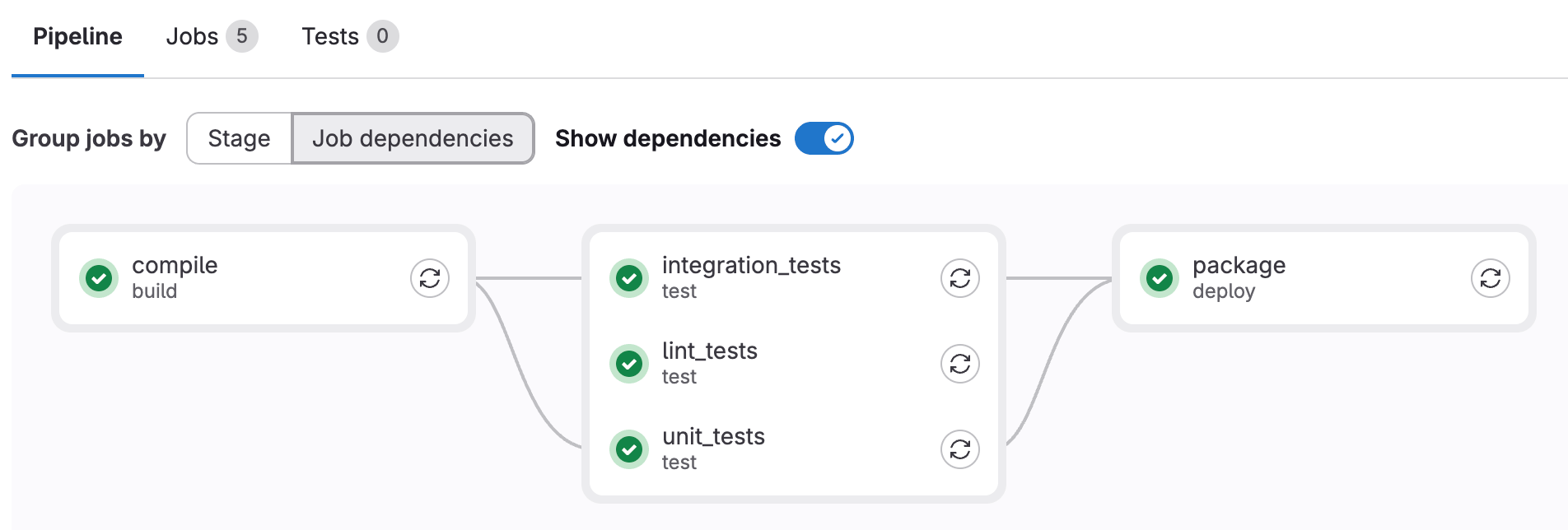
You can omit the stage and stages keywords and use only needs to define job order.
All jobs without a stage keyword run in the default test stage:
compile:
  script: echo "Compiling..."

unit_tests:
  needs: ["compile"]
  script: echo "Running unit tests..."

integration_tests:
  needs: ["compile"]
  script: echo "Running integration tests..."

package:
  needs: ["unit_tests", "integration_tests"]
  script: echo "Packaging..."
To view the structure of this pipeline, select Job dependencies
from the pipeline details page. If you use the default view, all jobs are grouped together in the test stage.
Optional dependencies
Use optional: true in needs to depend on a job only if it exists in the pipeline.
Use this option to handle jobs that may or may not run when combining needs with rules.
For example:
stages:
  - build
  - test
  - deploy

build:
  stage: build
  script: echo "Building..."

test:
  stage: test
  needs: ["build"]
  script: echo "Testing..."

test_optional:
  stage: test
  rules:
    - if: $RUN_OPTIONAL_TESTS == "true"
  script: echo "Optional tests..."

deploy:
  stage: deploy
  needs:
    - job: "test"
    - job: "test_optional"
      optional: true
  script: echo "Deploying..."
In this example:
deploydepends on:test, which always exists in the pipeline.test_optional, which only exists in the pipeline whenRUN_OPTIONAL_TESTSistrue.
- When
RUN_OPTIONAL_TESTSis:false, thentest_optionaldoes not exist in the pipeline anddeployruns aftertestfinishes.true, thentest_optionalexists in the pipeline anddeploywaits for bothtestandtest_optionalto finish.
Without optional: true, pipeline creation fails because the deploy job
expects test_optional, but it does not exist in the pipeline.
Combine needs with parallel:matrix
The needs keyword works with parallel:matrix to
define dependencies that point to parallelized jobs.
Troubleshooting
Error: 'job' does not exist in the pipeline
When you combine needs with rules, your pipeline might fail to create and display this error:
'unit_tests' job needs 'compile' job, but 'compile' does not exist in the pipeline.
This might be because of the only, except, or rules keywords. To need a job that
sometimes does not exist in the pipeline, use needs:optional.
This error is caused by one job with needs set to another job that does not exist in the pipeline.
To fix this issue, you must either:
- Add
optional: trueto the job dependency so that the needed job is ignored when it does not exist in the pipeline. - Update the
rulesconfiguration of the needed job to ensure it always runs when needed.
For example:
#
# Method 1: Job with rules that may not exist
#
compile:
  stage: build
  rules:
    - if: $COMPILE == "true"
  script: echo "Compiling..."

unit_tests:
  stage: test
  needs:
    - job: "compile"        # If $COMPILE == "false", the `compile` job is not added
      optional: true        # to the pipeline and this needs is ignored.
  script: echo "Running unit tests..."

#
# Method 2: Job with rules that always matches the dependent job
#
build:
  stage: build
  rules:
    - if: $BUILD == "true"
  script: echo "Building..."

test:
  stage: test
  rules:                    # Both jobs have identical `rules`, and will always exist
    - if: $BUILD == "true"  # in the pipeline together.
  needs: ["build"]
  script: echo "Testing..."